Self-hosted · Runs on your hardware
One Docker Command

Your hardware. One browser to control it.

Turn a Jetson, Raspberry Pi, or local server into a browser-based control station. Add live video, controls, and telemetry without building a frontend.

See how it works
JetsonRaspberry PiROS2MQTTWebSocketREST APILive VideoPWADocker Ready
flintbay.local / tracked-robot
Online
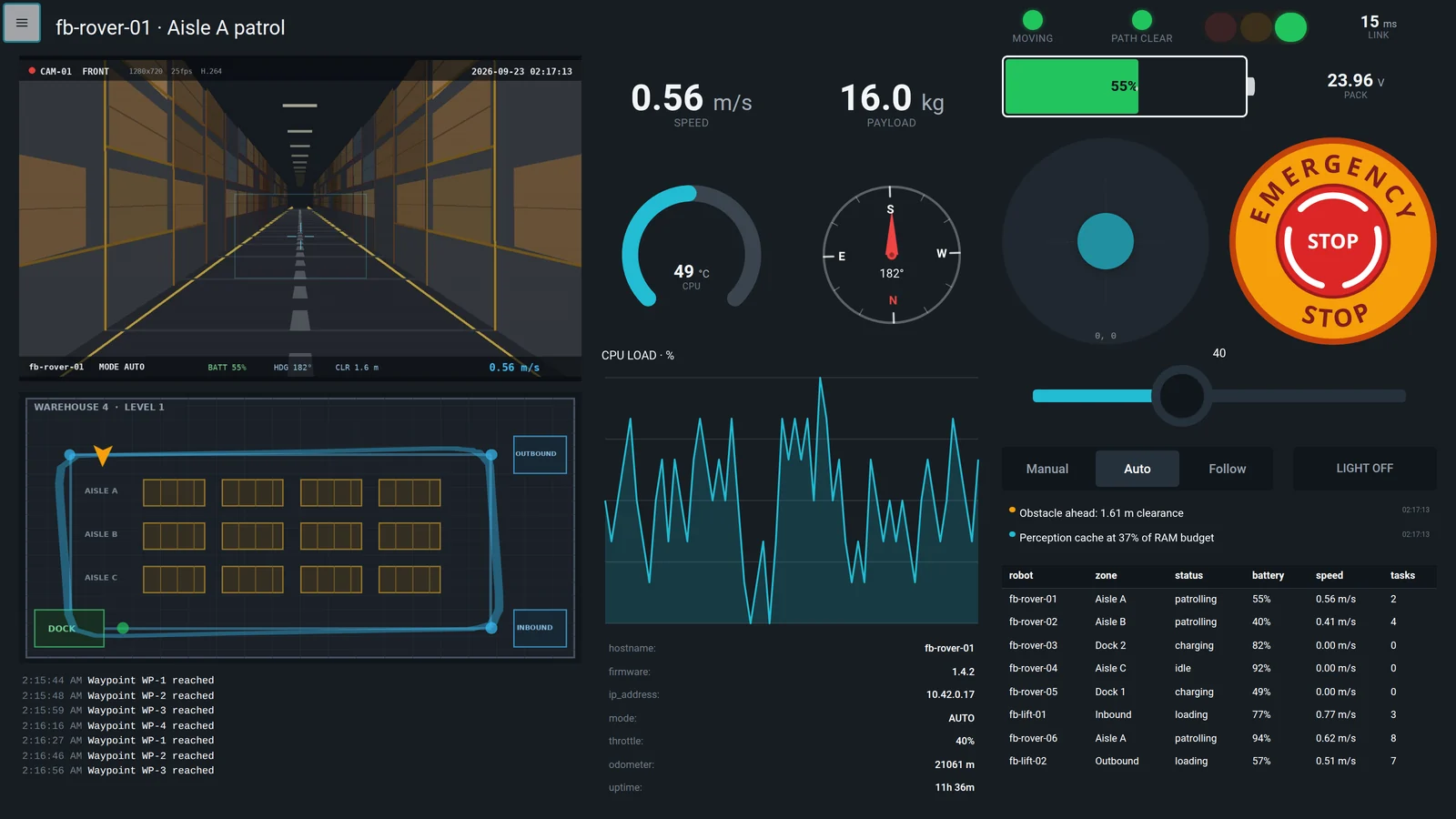
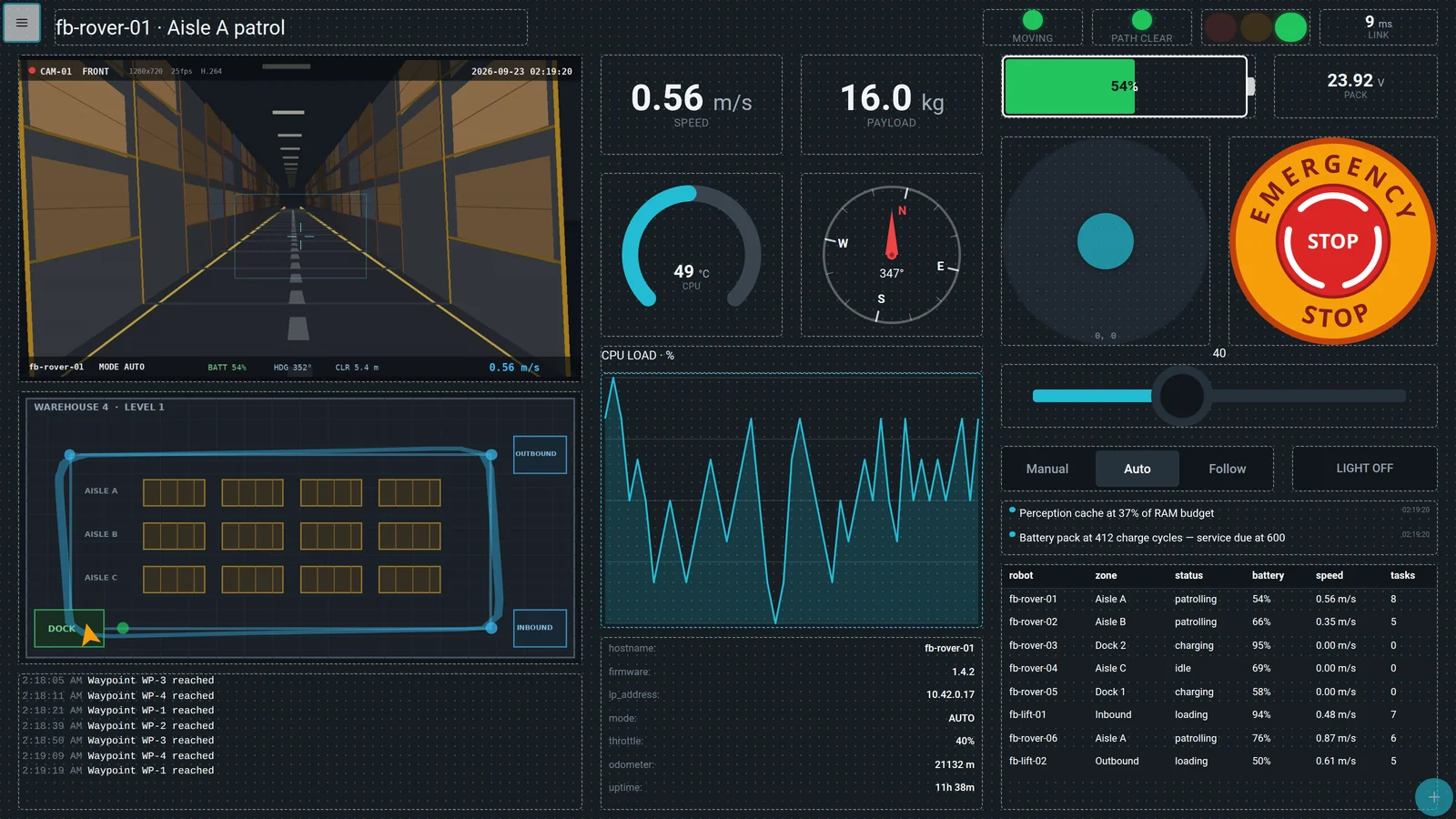
Flintbay teleoperation page: live camera, warehouse floor plan, gauges, emergency stop and a fleet table

Build the control station your machine needs

Start with a camera, joystick, buttons, and battery state. Add only what your operator needs from 42 reusable widgets across six categories.

Flintbay Control widgets running on live rover telemetry

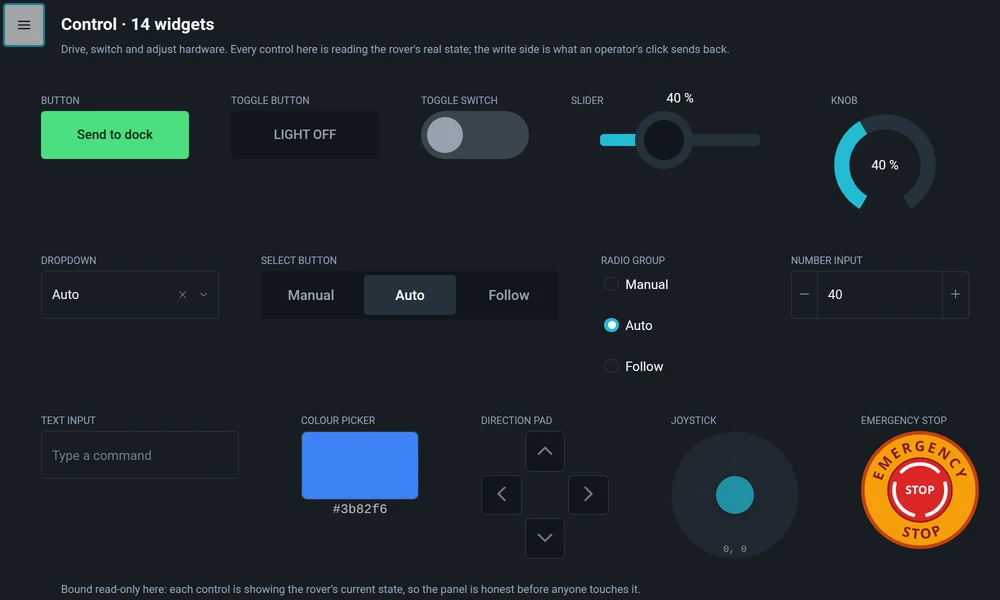
Control

Drive, switch and adjust hardware with controls designed for repeated operator use. Fourteen of them, each able to read state as well as write it.

ButtonToggle ButtonToggle SwitchSliderKnobDropdownSelect ButtonRadio GroupNumber InputText InputColour PickerDirection PadJoystickEmergency Stop

Your robot works. Why build another control app?

A joystick and a video player are easy to prototype. A control station that reconnects, keeps state in sync, survives long sessions, secures access, and works across devices is a separate software project.

Flintbay packages that reusable layer. You build the machine and its logic; Flintbay handles the browser control surface.

Why run it locally?

Responsive

Keep the control path close to the machine.

Private

Telemetry stays on infrastructure you control.

Available

Your local control station does not need the internet.

A separate frontend to maintain
Video, controls, and telemetry split across tools
Reconnect and stale-state edge cases
Authentication built from scratch
Layouts tied to one machine
Cloud dependency for local hardware

From endpoints to a working cockpit

Run Flintbay on a Jetson, Raspberry Pi, laptop, or server. Connect ROS2, MQTT, REST, or WebSocket, then arrange live video, controls, and telemetry without writing frontend code.

You bring:

  • A robot, test bench, or connected device
  • ROS2, MQTT, REST, or WebSocket endpoints
  • Camera and telemetry sources

Flintbay provides:

  • Live media widgets
  • Joystick & D-Pad
  • Buttons & setpoints
  • Gauges & charts
  • Transforms & bindings
  • Command feedback
  • Users, roles & audit
  • Saved device layouts

Three steps, no build pipeline

Describe where the data lives, drop the widgets an operator needs, and wire the ports. The dashboard stays live the whole time — there is nothing to compile and nothing to deploy.

  1. 1

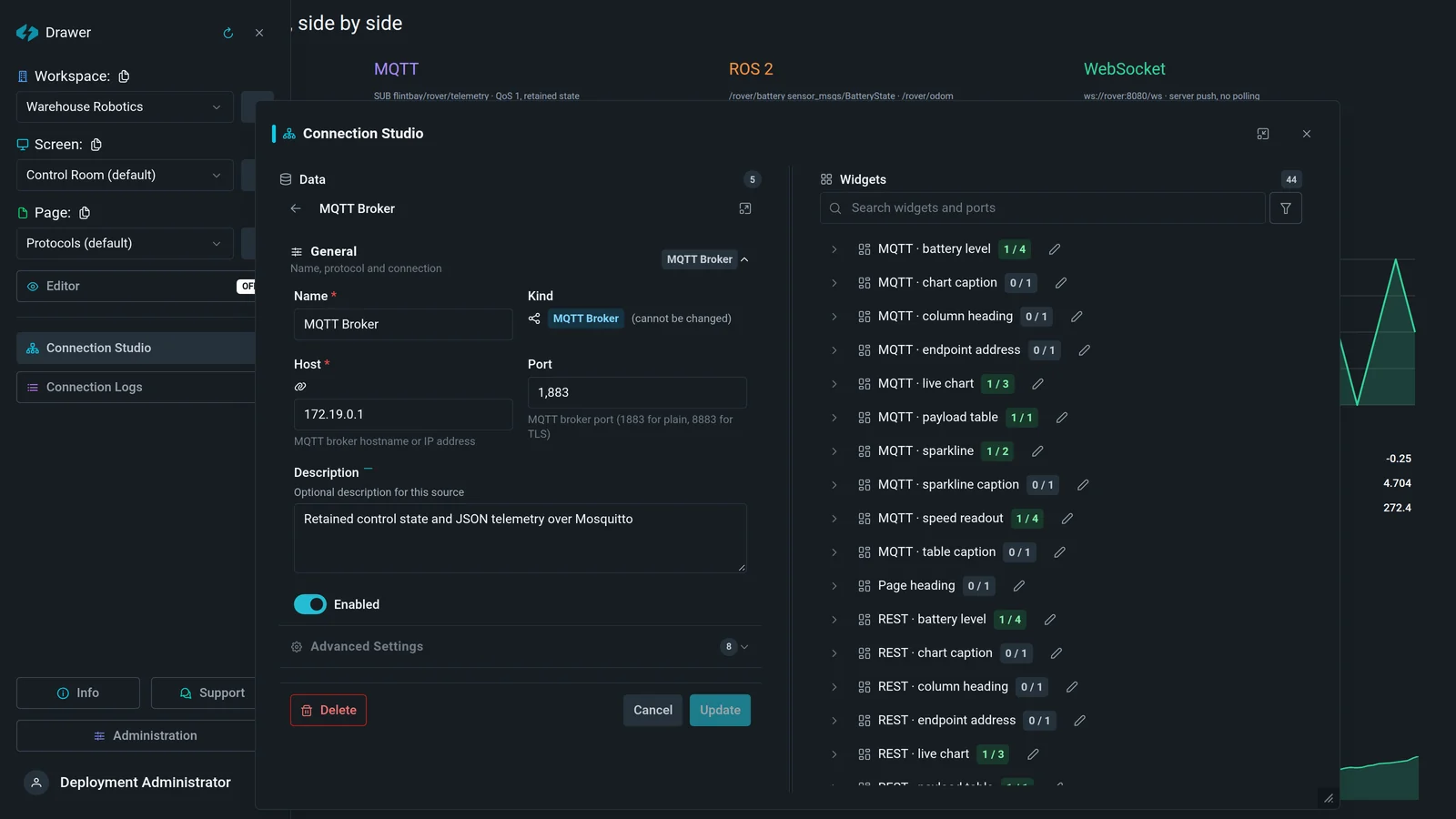
    Describe the source

    The Flintbay source editor: name, protocol, host and port for an MQTT broker

    A host, a port, and what it speaks. REST, MQTT, ROS 2, WebSocket or a media stream — the form knows what each one needs and says so inline.

  2. 2

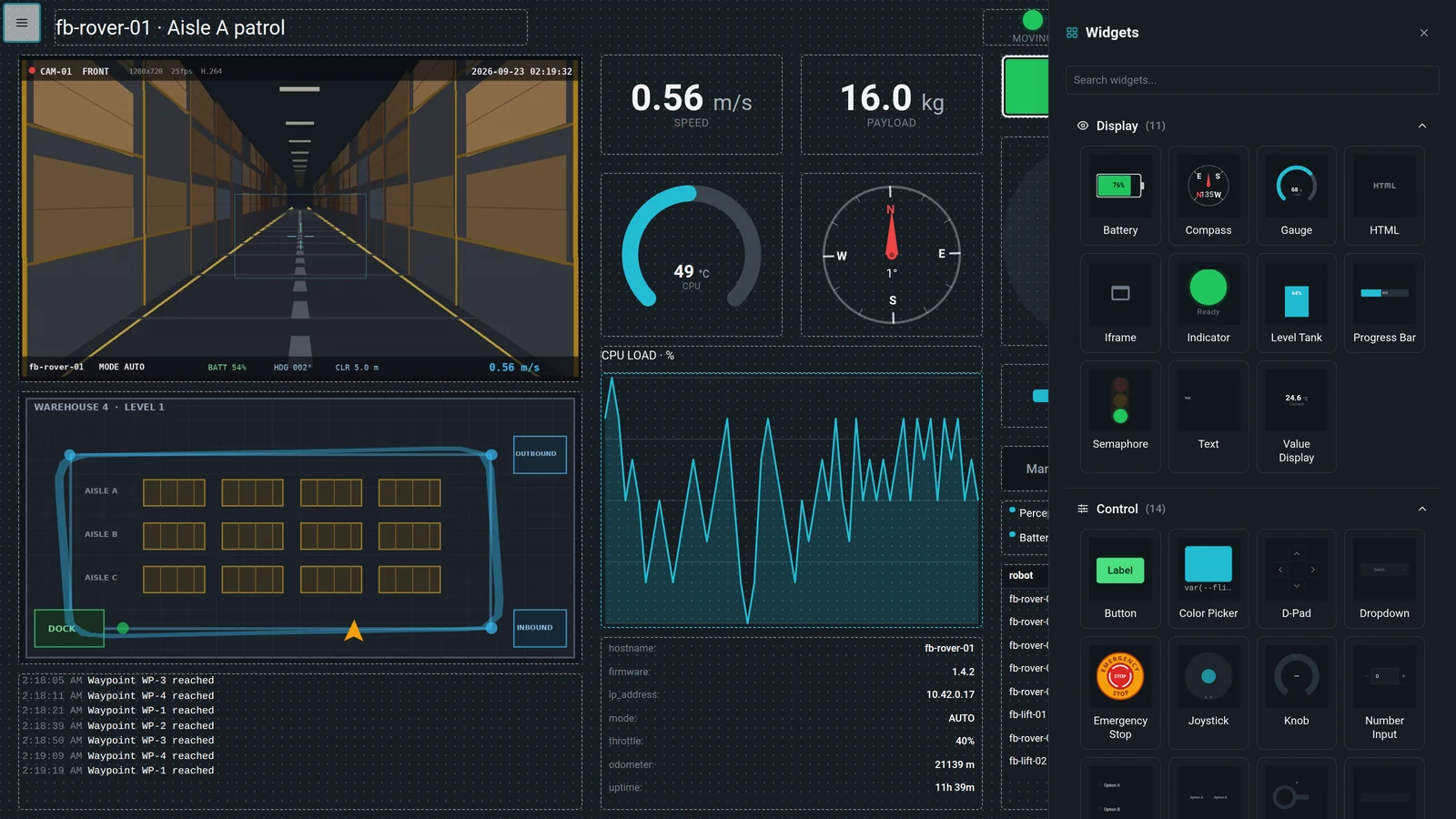
    Drop the widgets

    The Flintbay widget palette open over a live dashboard, showing display and control widgets

    Forty-two widgets across six categories, each previewed in the palette. The page underneath keeps running while you build on top of it.

  3. 3

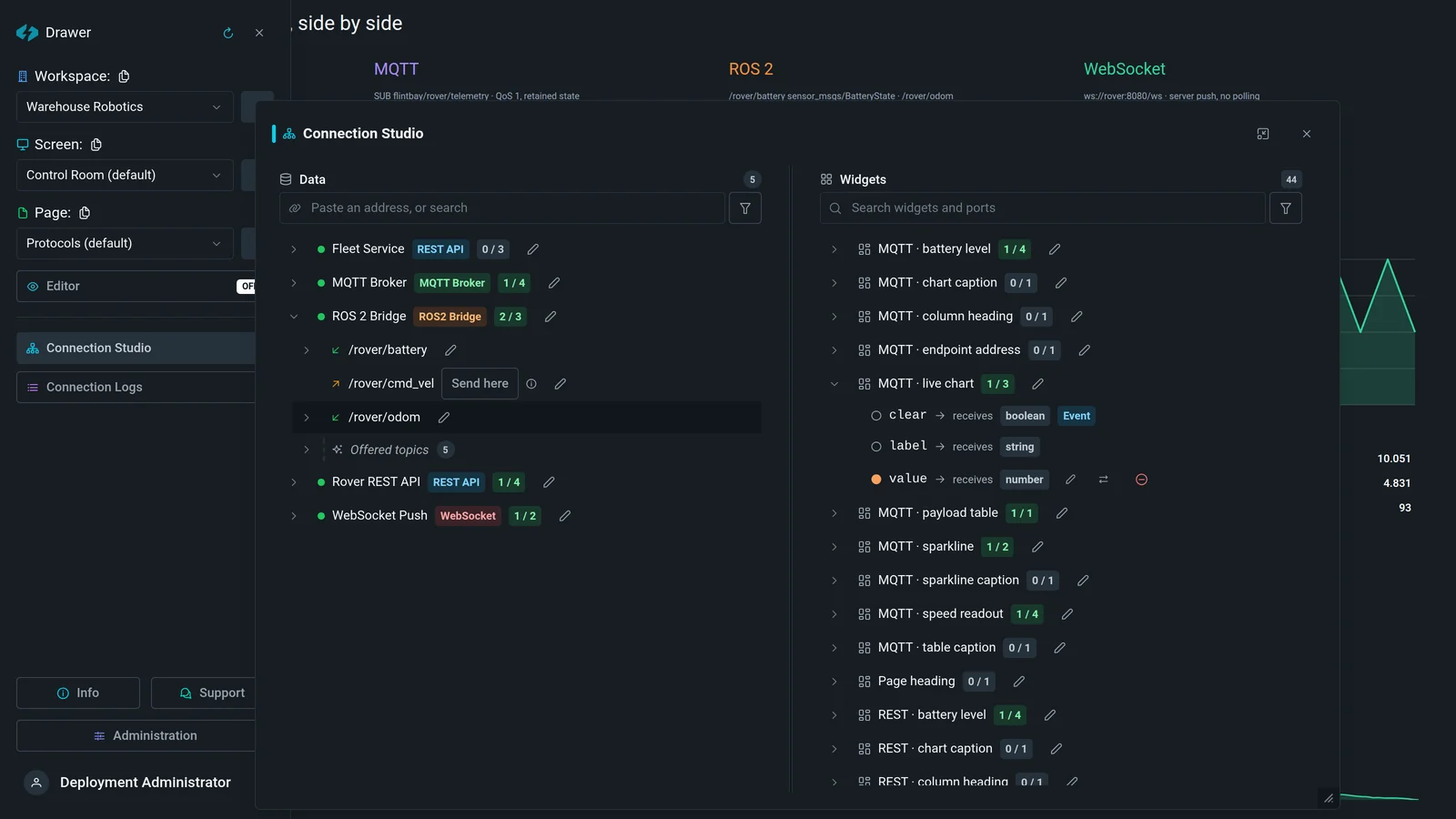
    Wire the ports

    Connection Studio showing a widget’s typed ports next to the endpoints that feed them

    Every widget exposes typed ports. Point one at a path in the payload and it is bound — Connection Studio shows which are fed and which are still waiting.

Each step is also an MCP tool, so an assistant can do the same work from a description of the machine.

Built for hardware you can touch

Start with a robot cockpit. Reuse the same control surface for a test bench, lab, or any local device with an API.

Robot Builders

Put live video, a joystick, drive controls, battery, and connection state in one browser view.

R&D & Test Benches

Build a reusable panel for actuators, sensors, cameras, and setpoints instead of another throwaway UI.

Makers & Robotics Labs

Give a TurtleBot, rover, or Jetson project a control station that opens on a laptop, tablet, or phone.

Connected Hardware

The same widgets can control lighting, irrigation, home-built automation, or anything exposed through an API.

Control, media, and telemetry together

Compose the operator view around the machine: interactive controls, live media, current state, history, and structured data on the same page.

A Flintbay page with a live camera, floor plan, gauges, emergency stop and fleet table side by side

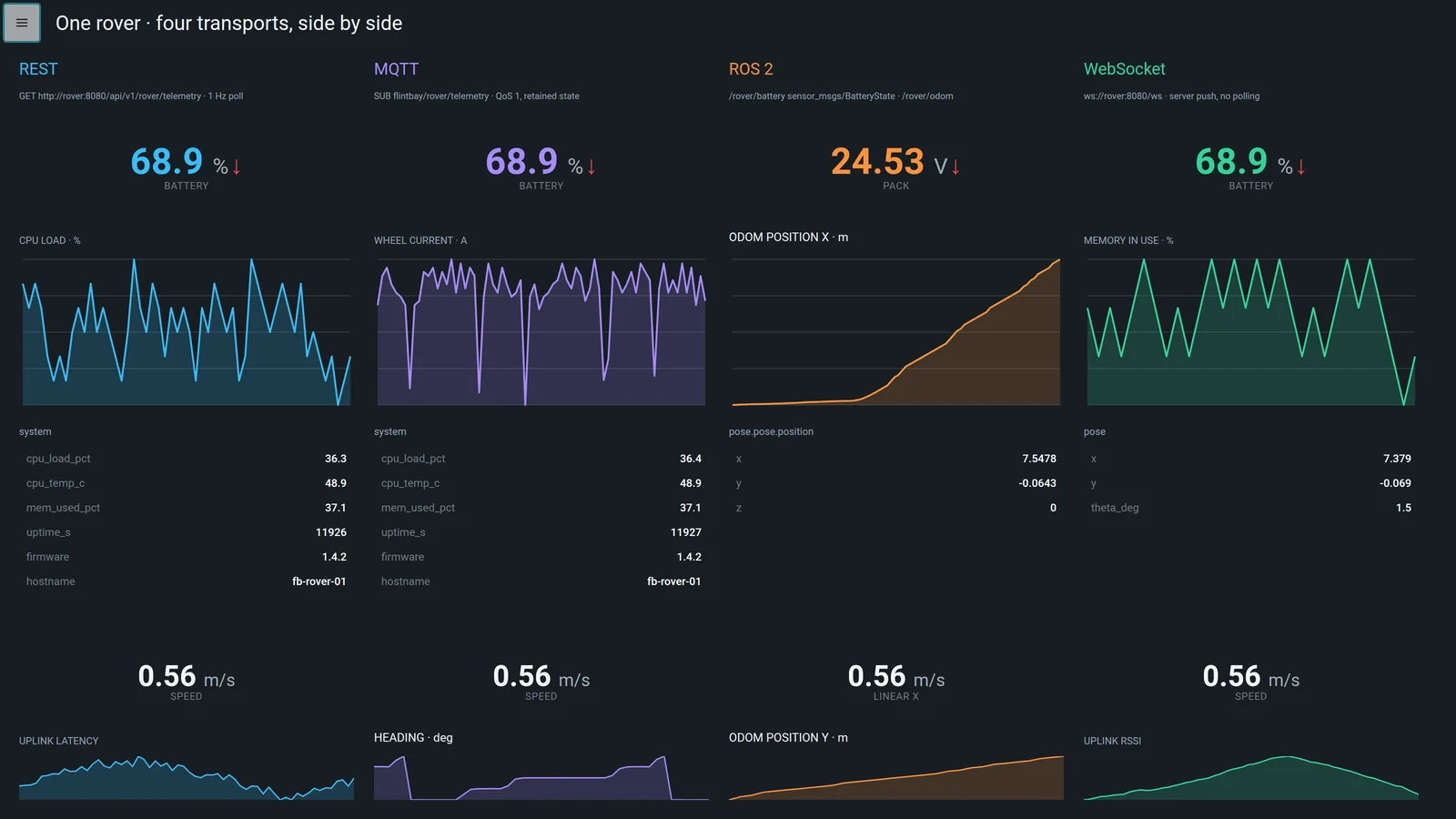
Protocol-independent widgets

Connect MQTT, REST, WebSocket, and ROS2 through declarative bindings. Keep the layout while the transport or payload evolves.

One rover shown four times over REST, MQTT, ROS 2 and WebSocket, all live at once

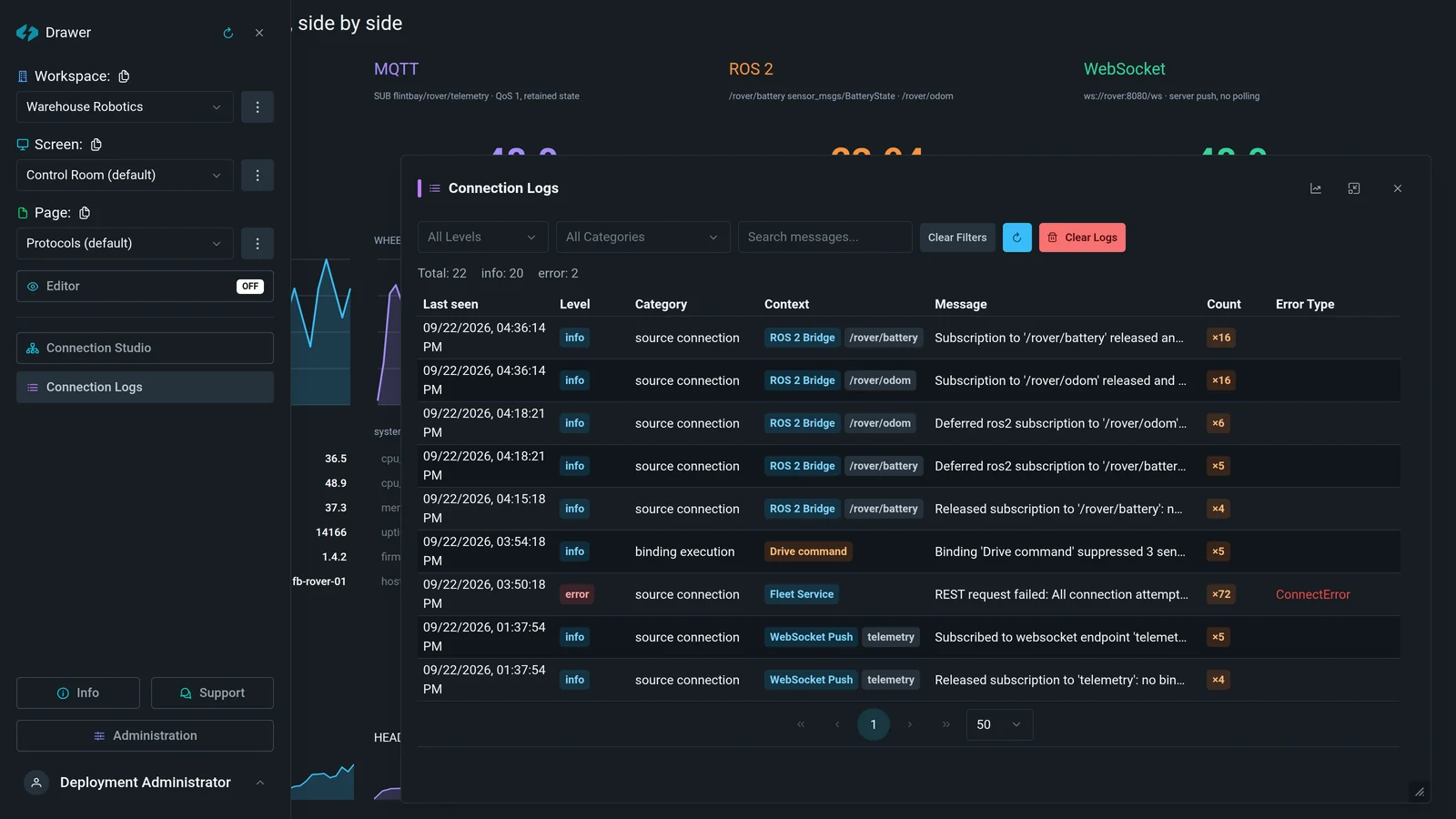
Application plumbing included

Authentication, workspace roles, account management, audit and system logs, reconnect behavior, command modes, and state synchronization are part of the platform—not a new backlog for every robot.

Flintbay connection logs: levels, categories, per-source context, occurrence counts and error types

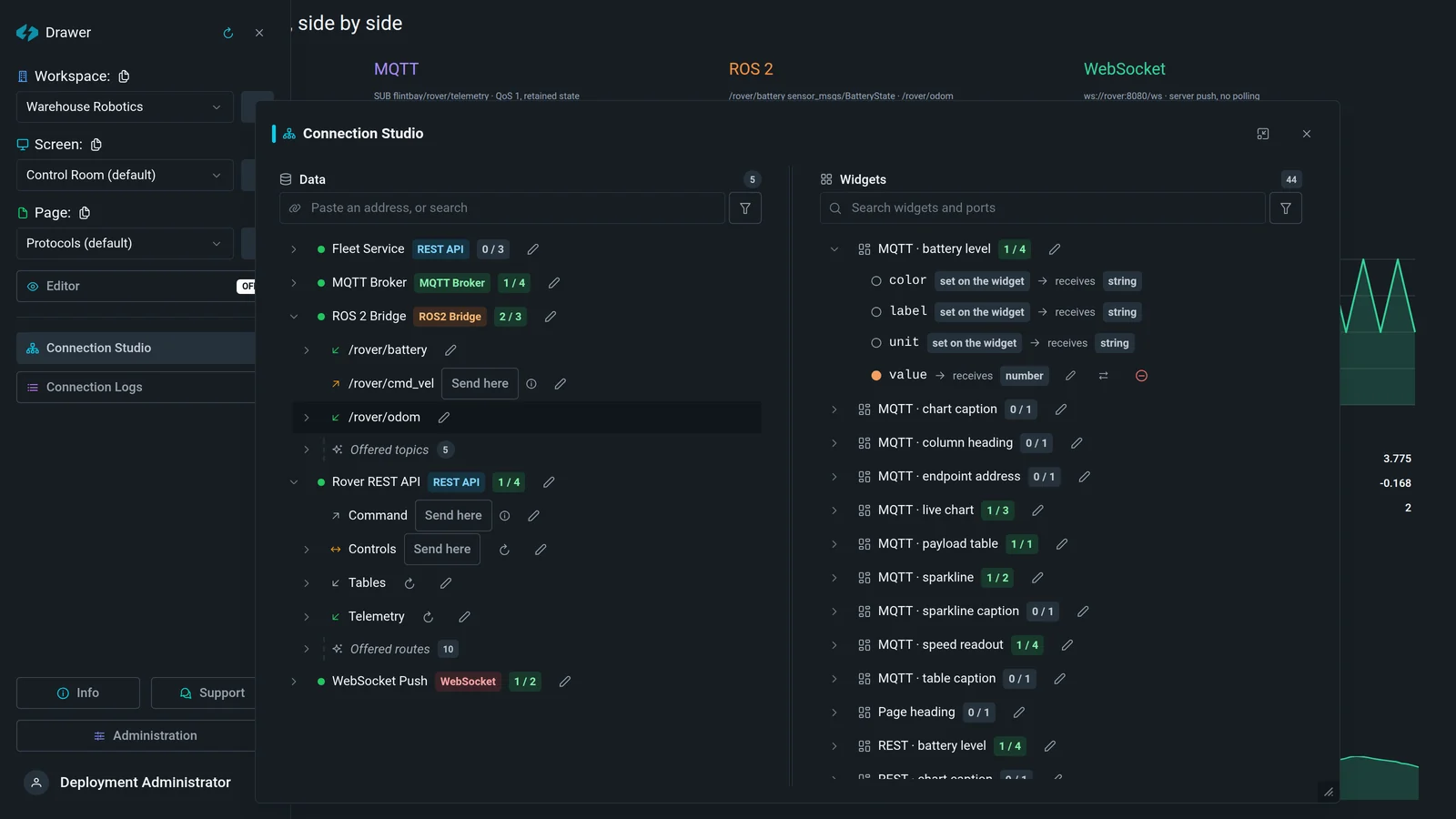
AI-assisted setup through MCP

Connect a supported AI client and create sources, endpoints, widgets, and bindings through structured tools instead of editing generated frontend code.

Connection Studio with five connected sources and their endpoints beside the widgets they feed

Twelve panels, one product

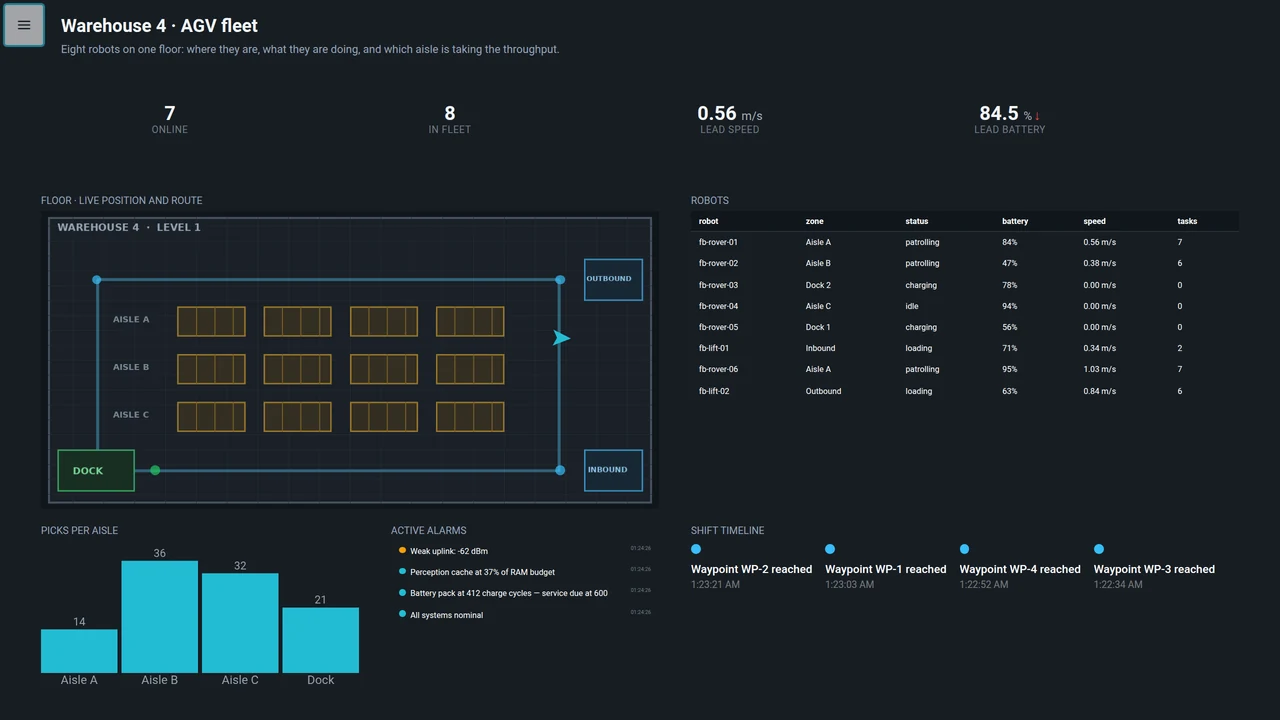
Every screen below was built in Flintbay and photographed running. Nothing is a mockup, and nothing is relabelled — each one reads its own simulated site, so a chiller says degrees and a spindle says percent of load.

Flintbay panel: Warehouse 4 · AGV fleet

Warehouse 4 · AGV fleet

REST · rover simulator

Eight robots on one floor: live position on the plan, who is charging, and which aisle is taking the throughput. The map background is an image the endpoint supplies, so a new site is a new file.

MapData TableBar ChartAlarm ListTimelineValue Display
Around the dashboard

The parts nobody wants to write twice

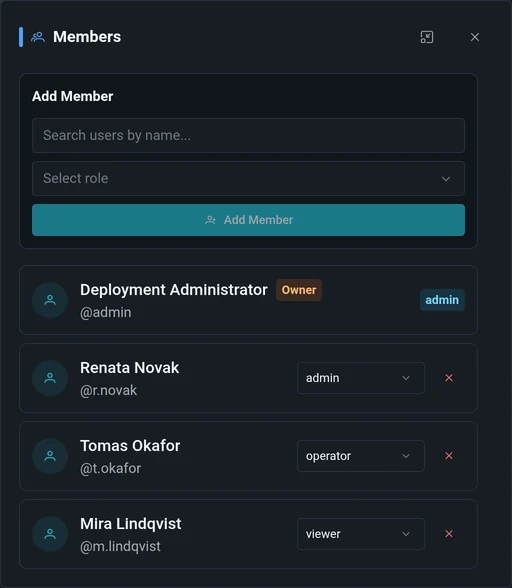
A control station is more than widgets. Accounts, roles, keys for automation, an audit trail and the logs that answer “why is this source quiet” are in the box. Each panel below is a photograph of the running product, not a feature list.

Flintbay workspace members panel with four accounts, each with a role dropdown

Membership is a workspace decision, not a deployment-wide one

The same account can run the warehouse floor and only watch the test bench. Four roles ship with the platform — admin, editor, operator, viewer — and the owner of a workspace changes them from this panel without an administrator in the loop.

Explore the control station

Get an account on the live instance with a workspace of your own. Demo setup attempts to add live Sources and Endpoints from one simulated rover—including telemetry, video, and audio. Provisioning is best-effort, so the activation screen reports what was actually added. Then add widgets and connect them in Connection Studio before installing anything. Email, a password, one activation link.

Flintbay in edit mode: a dotted placement grid over a dashboard that is still receiving live data

A public instance that may be reset without notice. Treat anything you build there as temporary, and don't reuse a real password.

Deployment

Keep the control station with the machine

Flintbay ships as one Docker image with the web app, API, PostgreSQL, and Redis. Run it on the robot's Jetson, a Raspberry Pi, a laptop, or a nearby server so the interface is ready whenever the hardware is.

Edge-ready

AMD64 and ARM64 images cover servers, laptops, Jetson, and Raspberry Pi.

Persistent by default

Saved layouts and configuration survive container restarts and image updates.

Local-first

Control traffic and telemetry can stay on the same network as the hardware.

Application security included

Authentication, sessions, workspace roles, rate limits, and audit logs are already part of the stack.

Full setup guide on GitHub
docker-compose.yml
# Run the control station beside your hardware
services:
flintbay:
image: ghcr.io/flintbayhq/flintbay:0.1.9
ports:
- "19580:19580"
- "8189:8189/udp" # live video
- "8189:8189/tcp"
environment:
FLINTBAY_PUBLIC_URL: http://localhost:19580
volumes:
- flintbay_data:/var/lib/flintbay
restart: unless-stopped
volumes:
flintbay_data:
$ docker compose up -d
✔ Control station ready at :19580

0.1.9 is the current release. :latest tracks the newest stable one; pin a version like this in production so an upgrade is something you choose.

Releases

What shipped, and which image it is

Every release is one image covering AMD64 and ARM64. Its index digest is what cosign signs, so the digest — not a tag — is what identifies a build. A running deployment reads this same list and compares it against its own version locally; nothing about the deployment is sent anywhere.

0.1.9

CurrentSecurity
  • Carries MediaMTX 1.21.2 with its Go standard library HTTP/2 and TLS fixes, and the current Debian fixes for curl.
  • Every server and browser dependency moved to its current release, including FastAPI 0.143, SQLAlchemy 2.1, Vue 3.5.44 and Vite 8.3.
  • Nothing changes in how Flintbay is configured or run.
Full notes sha256:a20e9c9ad74dd5048ffd9ef6c51a711688aa3fb42018f926ee3dc9460e680aef
All releases:

Older releases and the reasoning behind each change are in the changelog.

One developer, and a project you can keep

Flintbay is built independently by Andrii, a developer in Ukraine. It started as a way to replace a pile of physical controls with a camera, joystick, buttons and telemetry in a browser. It now runs beside real hardware on Jetson, and exists so the next machine does not need another control app written from scratch.

It is free to self-host and it stays that way: no seat count, no paid tier, no telemetry. Support is what buys the time to keep it moving — and it is the only thing that does.

Hardware to develop against

Boards, cameras and sensors, so widgets are built against machines that actually misbehave rather than against a mock that never does.

Time to keep shipping

Integrations, widgets and the unglamorous parts — reconnects, roles, audit trails. Support is what turns the next release from a maybe into a weekend.

Keeping it self-hosted

A tip jar is the alternative to a pricing page. It is why the deployment on your machine answers to you and reports nothing about itself: the only thing it fetches is the public list of releases, and that can be switched off.

Stable releases
10
First shipped
Sep 8, 2026
Latest
Oct 15, 2026
Every image
signed, AMD64 + ARM64
Support on Ko-fi Star on GitHub

A one-off tip is plenty, and starring costs nothing at all.

Open the browser. Control your hardware.

Camera, controls, and telemetry in one local operator view.
Deploy Flintbay, connect your endpoints, and build the panel around your machine.

Deploy it yourself
Runs locally
Realtime control
Access control included